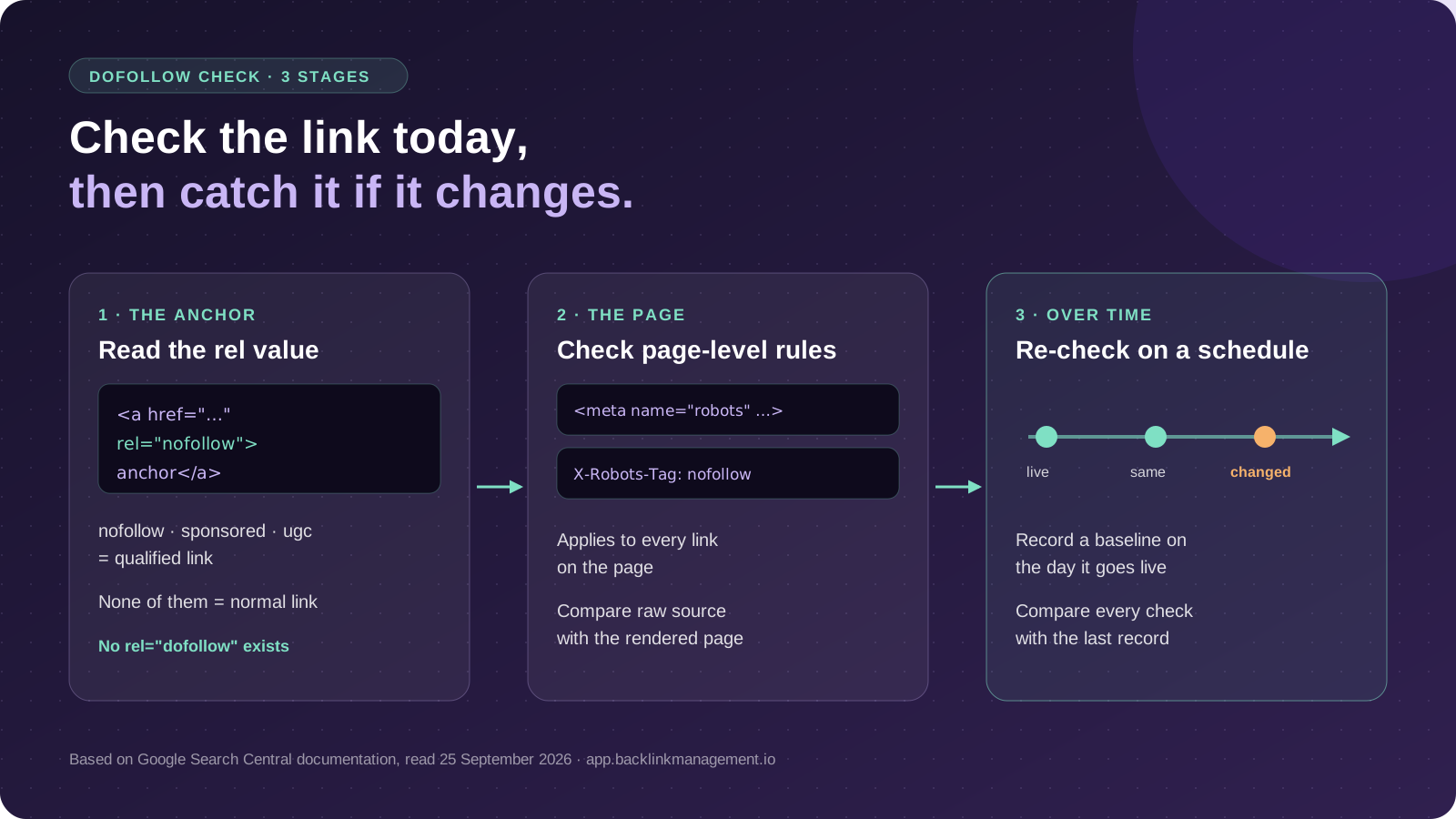
To check whether a backlink is dofollow, find the <a> element that points to your page and read its rel attribute. If rel contains nofollow, sponsored or ugc, the link is marked with one or more qualifying values. If none is present, it's a normal link, which is what people mean by dofollow. There is no rel="dofollow" value. Also check the linking page for a robots meta tag or X-Robots-Tag header with nofollow, and compare the raw HTML with the rendered page. A check only shows the link today, so re-check placements on a schedule and record what you find.
- Read the rel attribute: no nofollow, sponsored or ugc value means a normal link. There is no
rel="dofollow". - Check the page too: a robots meta tag or X-Robots-Tag with nofollow applies to every link on that page.
- Raw vs rendered: JavaScript can change the page after load. If the two disagree, record both.
- Hints, not switches: Google treats nofollow, sponsored and ugc as hints, so avoid absolute claims about ranking credit.
- One check is a snapshot: publishers can edit a link after it goes live. Re-check on a schedule and log the date.
Quick Answer: How to Check Whether a Backlink Is Dofollow
Find the link that points to your page and read its rel attribute. A normal link has no rel value that qualifies it:
- Normal link:
<a href="https://yoursite.com/page">anchor</a> - Qualified as nofollow:
<a rel="nofollow" href="…"> - Qualified as paid:
<a rel="sponsored" href="…"> - Qualified as user-generated:
<a rel="ugc" href="…">
"Dofollow" is shorthand, not an HTML value. Google's documentation says regular links need no rel attribute at all, and links marked nofollow, sponsored or ugc "will generally not be followed". A rel can hold several values, such as rel="ugc nofollow", and unrelated values like noopener do not qualify a link.
Source: Google, "Qualify your outbound links", last updated 10 December 2025, read 25 September 2026.
Checking once tells you the state of the link today. It does not tell you whether the publisher changes it next week, and that second question is the one most guides skip.
Method 1: Inspect the Link in Your Browser
This is the fastest check and works in any modern browser.
- Open the page that should link to you.
- Find the link, right-click it and choose Inspect.
- Read the highlighted link element (the
<a>tag) in the developer tools panel. - Confirm the destination: check that the
hrefpoints to the URL you expected, and note any difference in protocol, hostname, path or trailing slash. - Read the rel value, if there is one, and write down the literal text.
If you can't find the link visually, search the Elements panel for your domain name. A missing match is a different problem: see what to do when a guest post link is removed.
Method 2: Check the Page Source as Well
The Inspect panel shows the rendered page, after scripts have run. View Source (Ctrl+U, or Cmd+Option+U on a Mac) shows the HTML as the server sent it. If a script edits links after load, the two can differ.
If they match, record the value. If they don't, record both. Googlebot processes the initial HTML and can later render JavaScript before using the rendered HTML for indexing, so a script that changes the link after load is worth identifying rather than ignoring.
Source: Google, "Understand the JavaScript SEO basics", read 25 September 2026.
Don't Check Only the Link Tag
A link can be clean while the page around it says otherwise. Check two page-level signals:
- Robots meta tag: look in the
<head>for<meta name="robots" content="nofollow">(orgooglebotinstead ofrobots). Google defines the nofollow rule as "Do not follow the links on this page." - X-Robots-Tag header: the same rules can be sent as an HTTP header. Check it in the Network tab of developer tools or with a header-checking tool.
Google can only read page-level robots meta directives if it can crawl the page. If robots.txt blocks the URL, Google won't see a nofollow directive contained in that page's HTML.
Two quick extras, only if they apply: confirm the page returns a 200 status, and confirm your link isn't sent through a redirect you didn't agree to.
Source: Google, "Robots meta tag, data-nosnippet, and X-Robots-Tag specifications", last updated 24 March 2026, read 25 September 2026.
What Nofollow, Sponsored and UGC Mean
Google's documentation defines each value by purpose:
| Value | Google's stated use |
|---|---|
sponsored | Advertisements or paid placements |
ugc | User-generated content such as comments and forum posts |
nofollow | Other cases where the site doesn't want to associate with, or crawl, the linked page |
Since 2019, Google has treated all three as hints about which links to consider or exclude, rather than as fixed commands. Its announcement said that in most cases it would still treat them as before and not consider them for ranking.
So avoid both extremes. A qualified link is still a live link that can send visitors. An unqualified link is not a promise of ranking gains.
Source: Google Search Central Blog, "Evolving nofollow", 10 September 2019, read 25 September 2026.
What If a Backlink Was Dofollow and Changes to Nofollow?
A link that was followed on delivery day can be edited later. The publisher controls the page, and a plugin update, a new site-wide outbound-link policy, an editor's review or a change of owner can all rewrite it.
Publishers don't normally email you when they change a link. If a placement looks different from your baseline, these are the first things I'd check:
| What changed | What you see on re-check |
|---|---|
rel added to your link | Same anchor and href, now with nofollow, sponsored or ugc |
| Site-wide policy | Every outbound link on the page carries the same new rel value |
| Page-level rule added | Your <a> is unchanged, but a robots meta tag or X-Robots-Tag now says nofollow |
| Link repointed | The anchor is still there, but the href goes to a different URL or through a redirect |
| Link removed | Your domain no longer appears in the page's links at all |
Work through this before contacting anyone.
- Confirm it really changed. Re-check the raw source and the rendered page, and rule out a page-level robots rule.
- Record when you noticed it. Save the URL, the literal
relvalue, the date and a copy of the HTML. - Compare with your previous record. Without an earlier recorded state, you can't show it changed.
- Check what else changed. The anchor text, the target URL or the article itself may have been edited too.
- Work out whether it was deliberate. If every outbound link on the page changed at once, that's probably a site-wide policy or plugin change. If yours is the only one that changed, that's a different conversation.
- Check what was agreed. If the placement was bought or negotiated, read the written terms before asking for anything.
- Choose a response. Accept it, ask for a correction where the terms support it, or replace the placement.
One boundary matters. For paid placements, Google's spam policy expects sponsored or nofollow. If a paid link was changed to sponsored, asking the publisher to remove the qualification is asking them to break that policy.
If the placement itself is gone rather than changed, follow our guide to a guest post link that was removed instead.
Source: Google spam policies, link spam, read 25 September 2026.
How to Catch Link Attribute Changes After Publication
Inspecting a link tells you its state now. Catching a change means checking the same link again and comparing.
- Record a baseline on the day it goes live: URL, target, anchor,
relvalue, status code and date. - Re-check on a schedule that matches the value of the link, rather than only when rankings move.
- Compare against the last record, not your memory of it, and note the date of each check.
- Keep the evidence with the placement, so a dispute months later doesn't start from zero.
A spreadsheet works for a handful of links. Once you're tracking many placements or several clients, keep every placement and the notes from each check together in one backlink management workspace instead of scattered sheets.
Dofollow Checking Checklist
Use this for each link you check:
- Link present: the
<a>element exists on the live page. - Destination: the
hrefis your exact agreed URL. - rel value: recorded literally, or "none".
- Raw vs rendered: match, or both versions recorded.
- Page-level rules: no robots meta or X-Robots-Tag nofollow.
- Status and redirects: page returns 200; no unexpected redirect on your link.
- Date checked: logged, with a copy of the HTML.
Verdict: Check It Now, Then Check It Again
This method suits anyone verifying placements after they go live, from a single site owner to an agency tracking links across clients. It does not suit anyone trying to make a paid link pass ranking credit.
We didn't test third-party checker tools or measure how often publishers change link attributes. Everything above comes from Google's published documentation and our recommended checking routine.
BACKLINK MANAGEMENT
Stop building links by hand. Put them on automation.
Automated link building that keeps running month after month, with every placement recorded, re-checked and reported from the same workspace that holds your Search Console data.
Questions
Dofollow Backlinks: Questions
Inspect the link and read its rel attribute. If it has no nofollow, sponsored or ugc value, and the page has no robots nofollow rule, it is a normal link, which is what people mean by dofollow.
Usually, yes. A regular <a> link does not need rel="dofollow"; that value doesn't exist. But also check whether the linking page has a page-level nofollow directive before treating the link as unqualified.
Google recommends sponsored for paid placements, ugc for user-generated content such as comments, and nofollow for other cases where a site does not want to associate with the linked page. All three are treated as hints.
Yes. The publisher controls the page and can edit the link at any time. A saved baseline and scheduled re-checks are how you notice and prove a change.
A nofollow link can still send visitors. Google treats nofollow as a hint and said in 2019 it would generally still not consider such links for ranking, so do not count on ranking credit from one.
Where this lands
Verdict
- Who this suits
- Site owners and agencies checking whether live placements are followed, and anyone who needs a record of when a link changed.
- Who it does not suit
- Anyone trying to make a paid link pass ranking credit, or looking for a guaranteed ranking effect from a followed link.
- What we could not verify
- We did not test third-party checker tools or measure how often publishers change link attributes after publication. Guidance is drawn from Google Search Central documentation read 25 September 2026 and our recommended checking routine.